


 Switch to Smart
How to Convert Your Physical SIM to eSIM
For Existing Smart Subscribers (Postpaid, Infinity, Smart Prepaid & TNT)
Why Convert to eSIM?
- Quick activation: Scan a QR code, no need for a physical SIM.
- Dual SIM use: Keep your Smart number while adding another line on the same phone.
- Travel ready: Add a local eSIM abroad without removing your Smart SIM.
- More secure: Can’t be lost or damaged like a physical SIM.
- Device compatible: Works with the latest eSIM-capable smartphones.
How to Check if Your Phone is eSIM-capable:
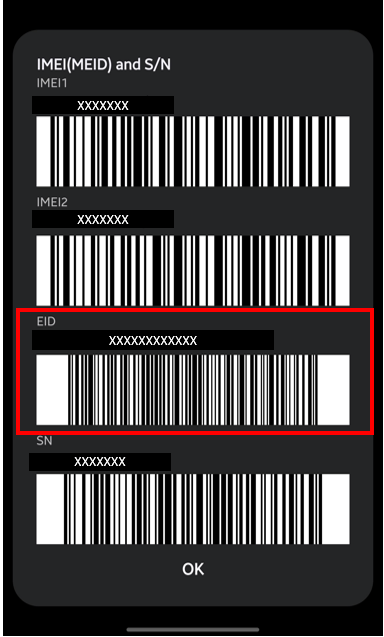
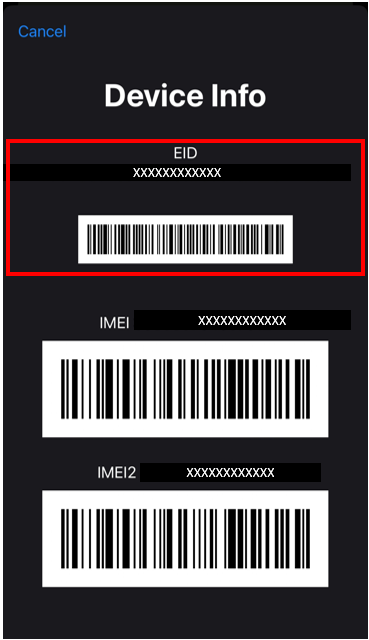
- Dial *#06# (iOS and Android)
- Check if with EID (Embedded Identity Document)
- If with EID, device is eSIM capable
- If without EID, device is not eSIM capable
With EID for Android
With EID for iOS
How to Convert Your Physical SIM to eSIM
- Go to any Smart Store near you.
- Click here to know the list of branches.
- Bring the following:
- A valid government-issued ID
- Your active Smart mobile number
- A valid email address (your eSIM QR code will be sent here)
- eSIM-capable device
- Pay the fee (if applicable):
- Postpaid/Infinity: Free of charge
- Prepaid: Standard replacement fee applies
- Smart Prepaid: ₱99
- TNT: ₱89
- Get your eSIM QR code by email and scan to activate it. It will be sent once the upgrade is processed. Follow the on-screen steps to complete setup.
Tips
- Keep your email accessible during the store visit.
- Keep your eSIM QR code secure and do not share it to protect your number.
- Seamlessly transfer your number to any device or to the latest iPhone.
Make the switch today and see how Smart eSIM keeps you connected more easily, securely, and conveniently—built for the way you live.