


 Switch to Smart
How to View or Download Your Smart Home WiFi Bill on the Smart App
Smart Home WiFi Postpaid subscribers can easily view or download their billing statements using the Smart App. You can check your current bill, billing history, and payment history anytime through the app.
Billing statements for the last 12 months are available for viewing or downloading.
How to View or Download Your Bill on the Smart App
Follow these steps to access your billing statements.
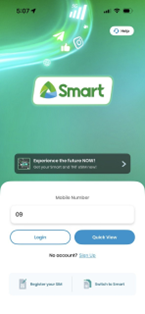
Step 1: Log in to the Smart App
Open the Smart App and log in using your mobile number and password.
If you don’t have an account yet, download the Smart App from the Google Play Store, Apple App Store, or Huawei AppGallery, then sign up using your mobile number.
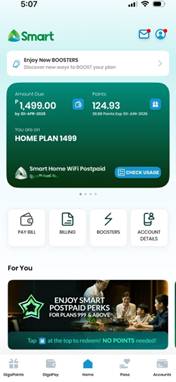
Step 2: Tap Billing
On the Smart App home page, go to Favorites and tap Billing.
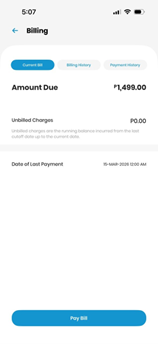
Step 3: Check your billing details
Inside the Billing section, you will see three tabs:
Current Bill
Shows your total amount due, payment due date, unbilled charges, and the date of your last payment.
You can also pay your bill by tapping Pay Bill.
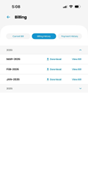
Billing History
Lets you view and download your past billing statements.
Payment History
Shows all payment transactions made through the Smart App.
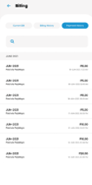
Step 4: View or download your bill
Tap Billing History to see your available billing statements.
You can choose to:
• View Bill to open the statement
• Download to save a copy of your billing statement
Step 5: Verify your account
To verify account ownership, enter the following details as they appear on your bill:
• Account owner’s first name and last name
• Account owner’s date of birth
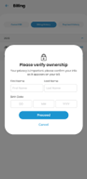
Tap Proceed to view or download your billing statement.